The best Dock alternative depends on what you are trying to fix. Some Mac users want a full Dock replacement, some want a Windows-style taskbar, and some simply want faster access to the exact window they need. This guide compares the practical options.
Written by the InfyniDock team. Vendor feature pages checked on . This is a workflow comparison, not an independent benchmark or a performance ranking.
Several tools offer previews and window switching. The difference is where those controls live, what else you need, and whether the current version supports your Mac.
Mac Dock alternatives: interface, capabilities, system requirements, and licensing, checked September 24, 2026
Move and resize windows with shortcuts or snap areas
macOS 10.15+
Free, open-source base app; Pro sold separately
Prices and compatibility are a snapshot of the linked official pages, not a guarantee for future versions. Taxes and upgrade terms may differ. DockMate’s listed release is from 2021; verify current-system support before buying. The order of this list is not a test score.
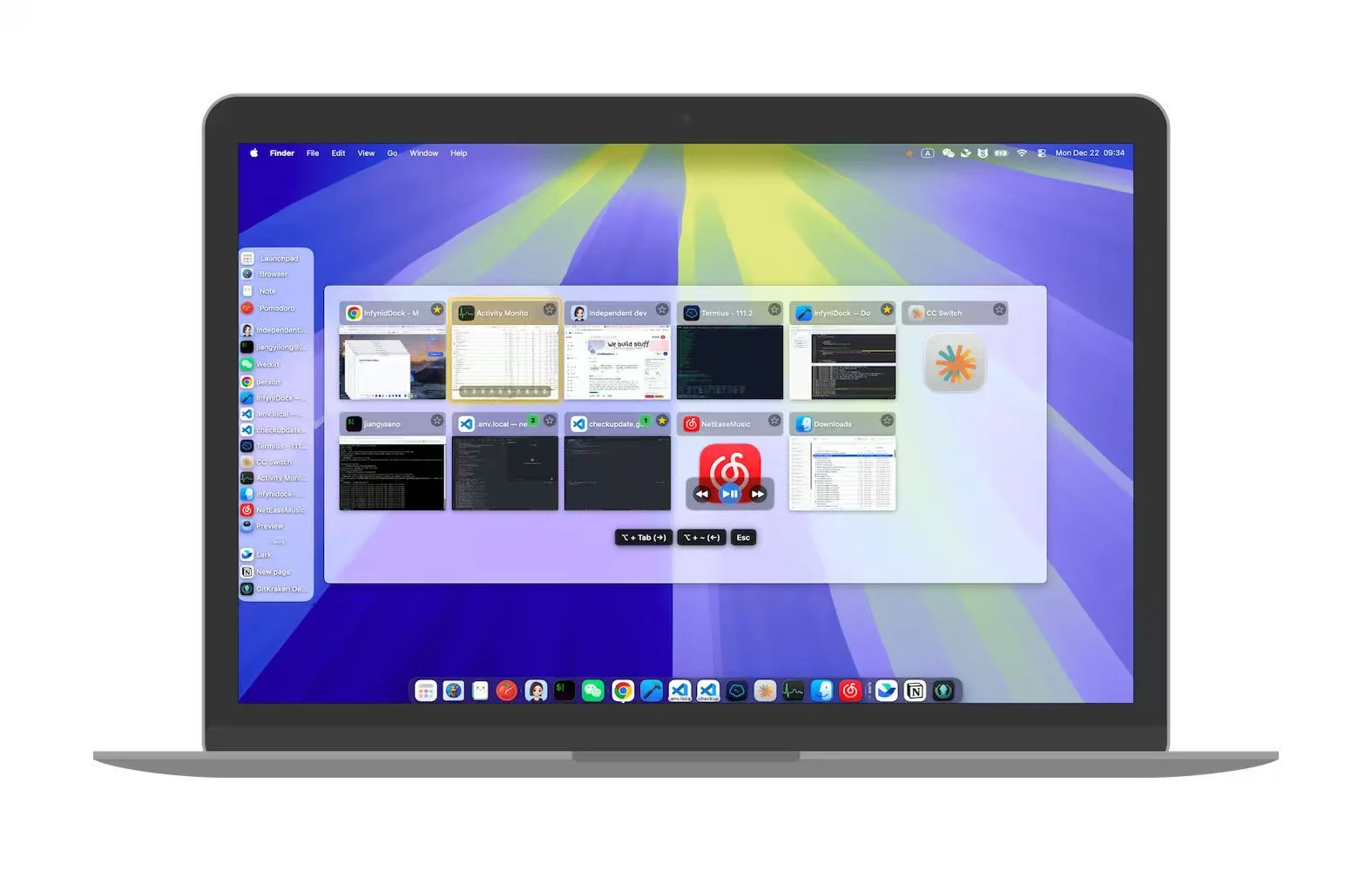
InfyniDock’s window selector in use. Try it with two recognizable windows first; available controls and appearance vary by version and settings.
InfyniDock Notch Dock, FloatDock, or a compatible native-Dock enhancer
If you need
You want a visible Dock replacement
InfyniDock Full Dock, uBar, or ActiveDock
If you need
You want temporary visual switching
InfyniDock FloatDock or AltTab
If you need
You manage many Chrome/Finder/editor windows
InfyniDock
If you need
You are comparing DockFix-style customization
DockFix for its custom Dock; InfyniDock for its choice of Dock and temporary selectors
If you need
You mainly resize and tile windows
Rectangle
If you need
You prefer a Windows taskbar metaphor
uBar
Top macOS Dock alternatives
This list includes traditional Dock replacements, Dock enhancers, keyboard switchers, and window managers because people use "Dock alternative" to mean several different jobs.
#1
InfyniDock
Exact window switching with a Dock, menu bar, or floating switcher
Excellent for moving and resizing windows with keyboard shortcuts.
Trade-off
It solves layout and tiling, not Dock replacement, live window previews, or exact Dock-style window access.
Why InfyniDock belongs in the shortlist
Notch Dock
Use InfyniDock from the macOS menu bar while keeping the native Dock.
FloatDock
Call a temporary visual switcher by shortcut, gesture, or mouse-wheel workflow.
Full Dock
Use a window-first Dock when you want visible, repeated access to exact windows.
If your real problem is that one app can have many windows, the native Dock is often too app-level. InfyniDock is built for the exact-window layer: preview the target, identify it, and activate it directly.
FAQ
What is the best macOS Dock alternative in 2026?
It depends on the workflow. InfyniDock is best for exact window switching and users who want Notch Dock, FloatDock, or Full Dock modes. DockFix is useful for Dock customization. uBar is best for a Windows-style taskbar. DockMate is best for adding previews to the native Dock. AltTab is best for keyboard-first switching.
What is a good DockFix alternative?
InfyniDock is a good DockFix alternative when the goal is not only visual Dock customization, but exact window switching, live previews, Notch Dock, FloatDock, workspaces, Spaces workflows, and multi-monitor control.
Which Mac Dock alternative should I use if I do not want to replace the native Dock?
Try InfyniDock Notch Dock or FloatDock for an on-demand window selector alongside the native Dock. DockMate adds native Dock previews, but check compatibility with your macOS version first.
Is InfyniDock a Dock replacement or a window manager?
InfyniDock is both a Mac window manager and a Dock companion. It can run as a menu bar Dock, a floating switcher, or a full window-first Dock, depending on the user preference.
What makes InfyniDock different from uBar or ActiveDock?
uBar and ActiveDock are closer to traditional Dock replacement tools. InfyniDock focuses on exact window-level switching, live previews, workspaces, multi-display workflows, and multiple modes so users can keep or replace the native Dock.
What is the best macOS Dock alternative for many Chrome windows?
InfyniDock is a strong fit because it is designed around exact windows, not only apps. That helps when Chrome, Finder, VS Code, Xcode, Terminal, or chat apps each have several windows open.